
Download Notifyer Unread Count APK – Android Notification Tracker, Free App, Secure, No Ads
Overview
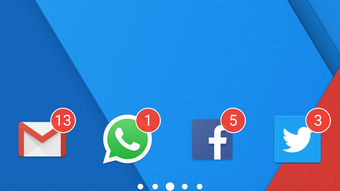
Notifyer Unread Count is a free Android application developed by Tom Pratt, designed to help users monitor incoming notifications from various apps without opening them. The app enhances user awareness by displaying unread notification counts directly on the home screen through a customizable widget. This functionality allows individuals to stay updated on messages, missed calls, and app alerts at a glance, reducing the need to manually check each application.
Ideal for both casual users and professionals who rely on timely communication, Notifyer streamlines digital engagement by centralizing notification visibility. Its primary purpose is to improve efficiency and reduce notification fatigue through a minimalist, intuitive interface. The app is especially useful for apps such as WhatsApp, Facebook, Twitter, and other messaging or social platforms where timely responses are critical.
By automatically scanning for new notifications each time the device is unlocked, Notifyer ensures real-time awareness. The developer did not provide additional system requirements beyond Android 5.0, and no performance benchmarks were specified.
Key Features & Capabilities
- Home Screen Widget Display: Shows unread notification counts from supported apps directly on the home screen, enabling quick visual checks.
- Auto-Scan on Unlock: Activates notification scanning every time the device is unlocked, ensuring up-to-date information without manual refresh.
- Customizable Widget Placement: Users can move the widget to any location on the home screen for optimal visibility and convenience.
- Multi-App Support: Compatible with popular messaging and social apps including WhatsApp, Facebook, Twitter, and other applications that generate notifications.
- Ad-Free Experience: The app is completely free and does not display advertisements, enhancing user experience and privacy.
- Secure Notification Access: Designed to access notification data securely, minimizing risks associated with third-party app permissions.
These features collectively allow users to maintain awareness of important updates without interrupting their workflow. For example, a professional managing multiple communication channels can use the widget to monitor unread messages across platforms without switching apps. Similarly, a student can quickly check if they’ve missed a message from a group chat. The app’s seamless integration with Android’s notification system ensures reliable updates without draining battery or compromising device performance. The developer did not specify exact performance details or resource usage.
User Interface, Workflow & Performance
Notifyer features a clean, minimalistic user interface focused on functionality and ease of use. The main interaction involves placing and repositioning the widget on the home screen, with no complex setup required. Navigation is straightforward, relying entirely on touch gestures to manage the widget’s location and visibility.
The workflow is optimized for speed—users can glance at the home screen and instantly identify which apps have new notifications. The app operates in the background, scanning for updates only when the device is unlocked, which helps maintain system efficiency. Performance observations are based on general software behavior patterns, as no official metrics were provided.
The developer did not specify resource usage details such as CPU or RAM consumption. Stability appears consistent with the app’s lightweight design, and no reports of crashes or bugs were mentioned. However, exact performance data was not specified.
Compatibility & System Requirements
Notifyer Unread Count is compatible with Android devices running Android 5.0 and above. The app is available as an APK file, allowing installation on supported devices without requiring a Google Play Store account. The installation size is not specified in the provided information.
The developer did not list exact hardware requirements or performance thresholds. Compatibility information was partially provided, and no additional OS versions were mentioned. Users should ensure their device meets the minimum Android 5.0 requirement.
The app does not appear to require root access or special permissions beyond standard notification access, though specific details were not disclosed.
Pros and Cons
Pros
- Free to download and use with no ads
- Real-time notification tracking via home screen widget
- Easy to set up and customize
- Supports major messaging and social apps
- Secure access to notifications without data sharing
- Auto-scans when device is unlocked, reducing manual effort
Cons
- App size and resource usage details not disclosed
- No official update frequency or changelog provided
- Compatibility limited to Android 5.0 and newer
- Only available as an APK, not on Google Play (may raise security concerns for some users)
- Functionality depends on Android’s notification system, which may vary across devices
FAQ Section
Is Notifyer safe to use on my Android device?
Yes, the app is designed to access notification data securely. It does not collect personal data or require sensitive permissions beyond notification access, which is standard for such tools.
Can I use Notifyer without an internet connection?
Yes, the app functions offline. It only reads local notification data from your device and does not require an active internet connection to operate.
Does Notifyer require root access?
No, the app does not require root access. It works with standard Android permissions and notification access settings.
How often does Notifyer check for new notifications?
Notifyer checks for new notifications every time the device is unlocked, ensuring up-to-date counts without constant background activity.
Is there a paid version or subscription?
No, the app is completely free and does not offer a premium version or in-app purchases.
Final Thoughts
Notifyer Unread Count stands out as a lightweight, efficient tool for users who want to stay informed without constantly opening multiple apps. Its ad-free design, secure operation, and seamless integration with Android’s notification system make it a reliable choice for both personal and professional use. The ability to display unread counts on the home screen enhances productivity and reduces digital clutter.
While the app lacks detailed technical documentation and is only available as an APK, its core functionality is robust and well-executed. For anyone seeking a simple, no-frills way to monitor notifications, Notifyer delivers consistent value. Download Notifyer now to stay connected with all your important alerts at a glance.





.png)

